What the product does today, area by area: from finding what to write about and who to reach, through writing, approval and publishing, to measuring what it changed.
Good to know: AI drafting, AI-answer checks and lead searches run on AI provider keys you connect, billed to you by the provider.
Command Center and Domains
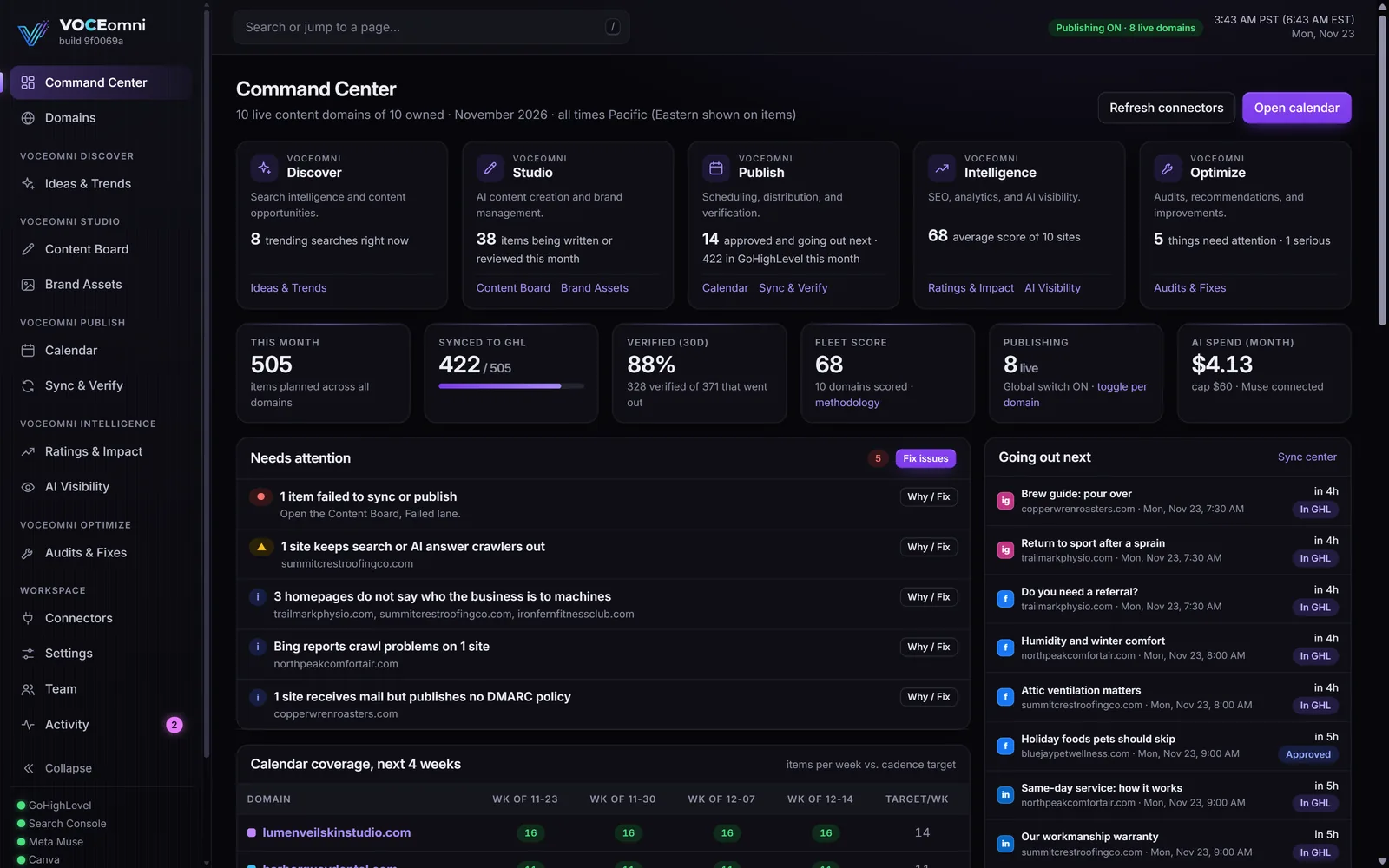
Where a workspace starts each day: what is going out, what needs attention, and how every site is doing.
Calendar coverage for the next four weeks, this month’s content by stage, what goes out next, and what just published.
What is trending in the US, and which sites’ scores moved in the last 28 days.
Needs attention: every problem has a Why / Fix panel with a plain-English cause, the evidence, exact steps, and who has to act.
Fix issues runs only the safe fixes in one press. It never publishes, never spends money, and changes nothing outside the workspace.
Snooze an item for 1 to 90 days and it comes back by itself.
Domains
A registry of every domain you manage with its live status: whether the site answers, its certificate, and when the registration expires.
An Engine Score for each domain, with its Ahrefs Domain Rating and Search Console clicks, impressions and position.
A brand profile per domain: voice, facts, rules and content pillars. The AI writer works from these and the brief, nothing else.
A live switch per domain that decides whether its posts may go to GoHighLevel.
Proof of ownership by DNS record, meta tag or file.
Archive a domain and bring it back later, or delete it permanently.
Discover
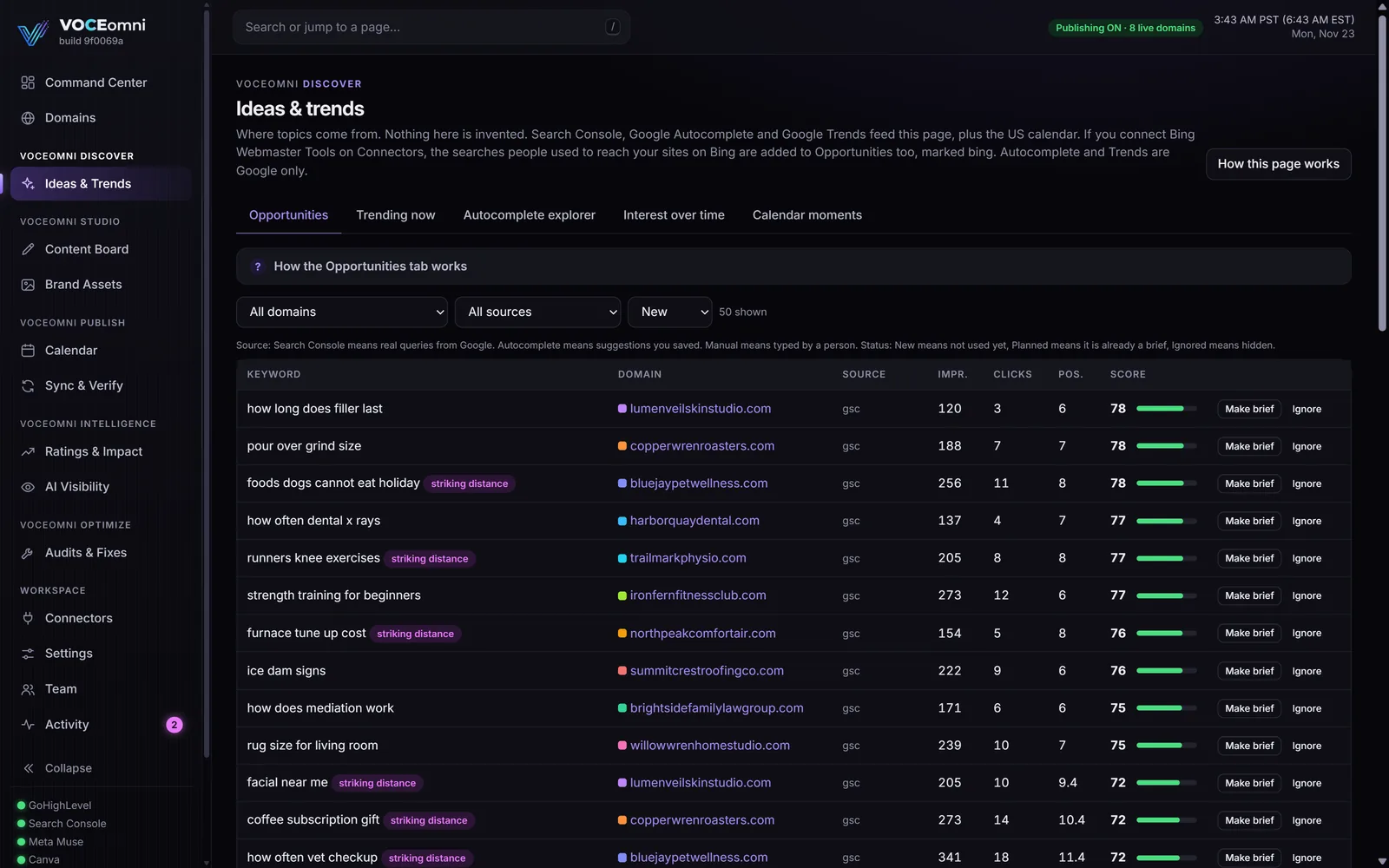
Search intelligence, content opportunities and leads: find what people are really asking before anyone writes a word, and find the businesses worth reaching.
Opportunities: search phrases worth writing about, from your own Search Console data, with impressions, clicks, position and a score.
Trending now, an autocomplete explorer, interest over time, and calendar moments worth planning around.
Bing’s top queries join the list when Bing Webmaster Tools is connected.
Every tab explains itself: what it does, why it matters, the steps, and an example. A guided tour opens the first time.
Planner
Builds dated briefs for each domain from its posting cadence and content pillars.
Topics come from real Search Console queries and autocomplete suggestions.
A planned item starts as a brief, ready to be written when you choose.
Lead Finder
Describe each site’s customer once: businesses or private people, who they are, where they are, what they must have, and who to leave out.
Fill that description from the brand profile for free, or have your AI writer draft it. The price is shown before you click, and a person saves it.
Search one place at a time. One AI search engine you connected (ChatGPT, Gemini or Perplexity) is asked for up to 12 businesses that fit.
Every business the engine names is checked on its own website before it is listed. It stays only if its name is on the front page and the site publishes a phone number, an email or a street address.
The phone, email and address come from the business’s own site, never from the AI’s answer. Each business that is dropped is shown with the reason.
The cost of a search is set aside from your monthly AI-answer budget first. A search that would go over is refused before anything is asked.
Lead lists
Private people are never looked up on the web. For owner and consumer leads you upload a list you already have, and the page shows what it would add before it adds anything.
One lead per business for each site. Mark one “Not a fit” and a later search cannot bring it back.
Export the list as a spreadsheet for a mailing.
Create contacts in GoHighLevel from the leads you choose. A contact GoHighLevel already has is left exactly as it is.
New contacts are created with texting switched off, because nobody on the list has agreed to texts.
VOCEomni never sends a message to a lead.
Studio
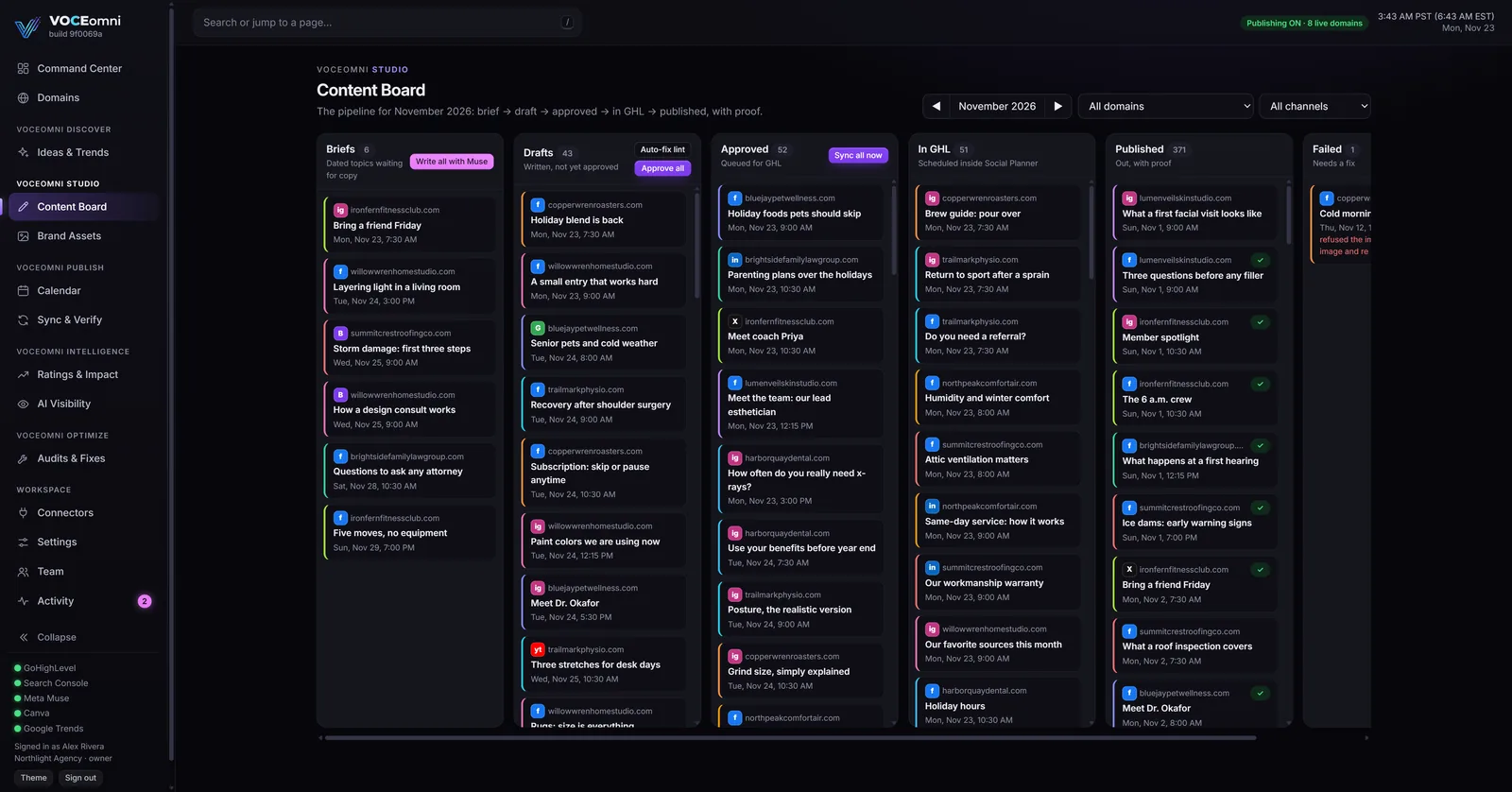
AI content creation and brand management: write, check, illustrate and get sign-off in one place.
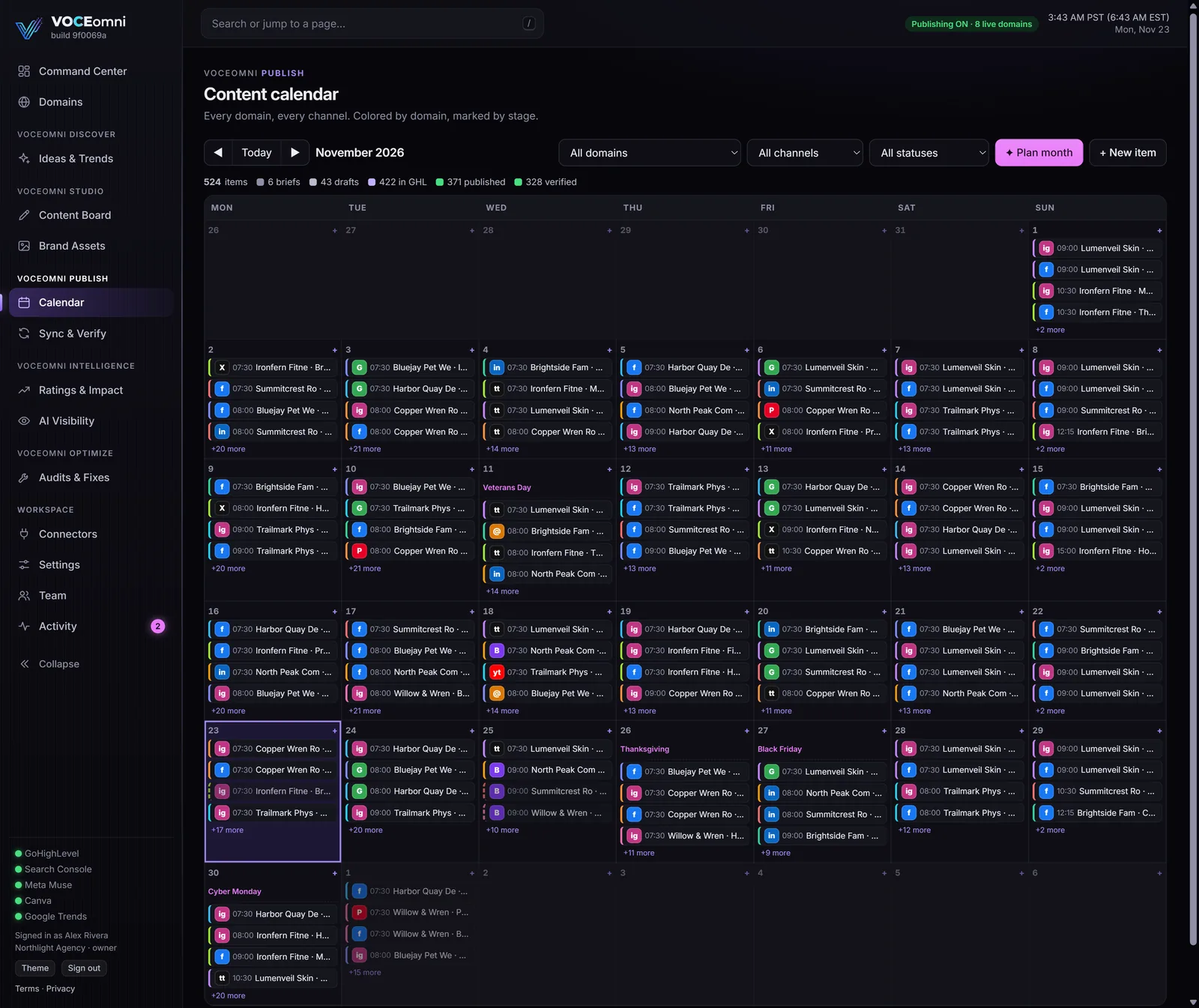
A month grid across every domain, colored by domain and marked by stage.
Drag a post to reschedule it. US holidays are overlaid.
GoHighLevel publishing
Push a post to GoHighLevel Social Planner as a private draft for review, or send an approved post to be scheduled.
GoHighLevel publishes to the networks connected in your account: LinkedIn, Facebook, Instagram, Google Business Profile, TikTok, X, YouTube and Pinterest.
A readiness check says exactly what is blocking a post before it is sent.
Import everything already in Social Planner, so the calendar shows the whole picture.
Re-sync a post after an edit, or take it back out of GoHighLevel.
Verification
After GoHighLevel publishes, VOCEomni gathers evidence in four steps: GoHighLevel’s status, the link on the network, the landing page, and Google indexing.
A ledger keeps the evidence for every post.
Feeds and exports
RSS, JSON and calendar feeds for each domain, each on its own private address.
A CSV export in GoHighLevel’s bulk-upload format.
Blog posts and emails are written and approved here, then handed over through a feed or the export.
Intelligence
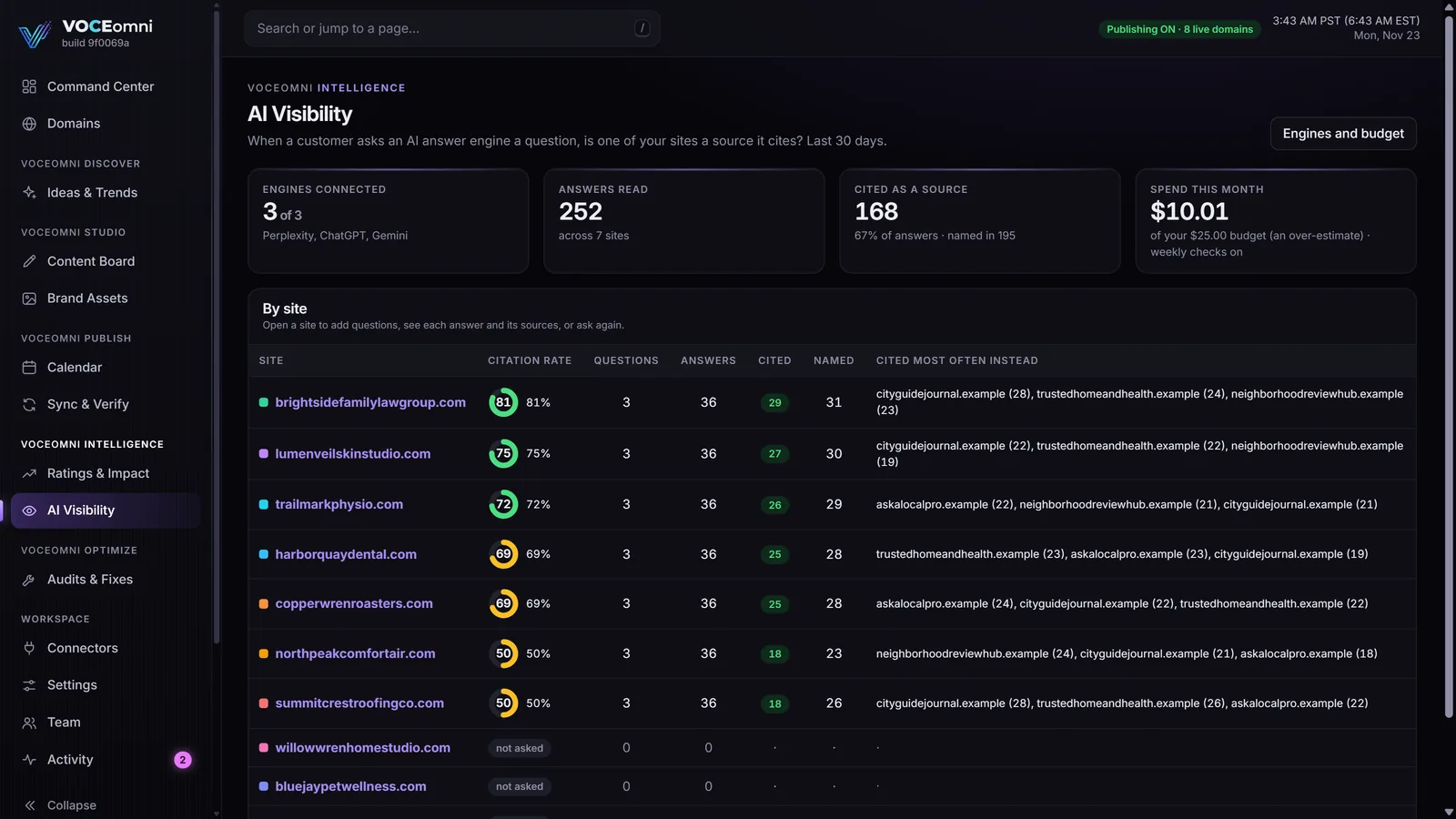
SEO, analytics and AI visibility: see whether the content is moving anything.
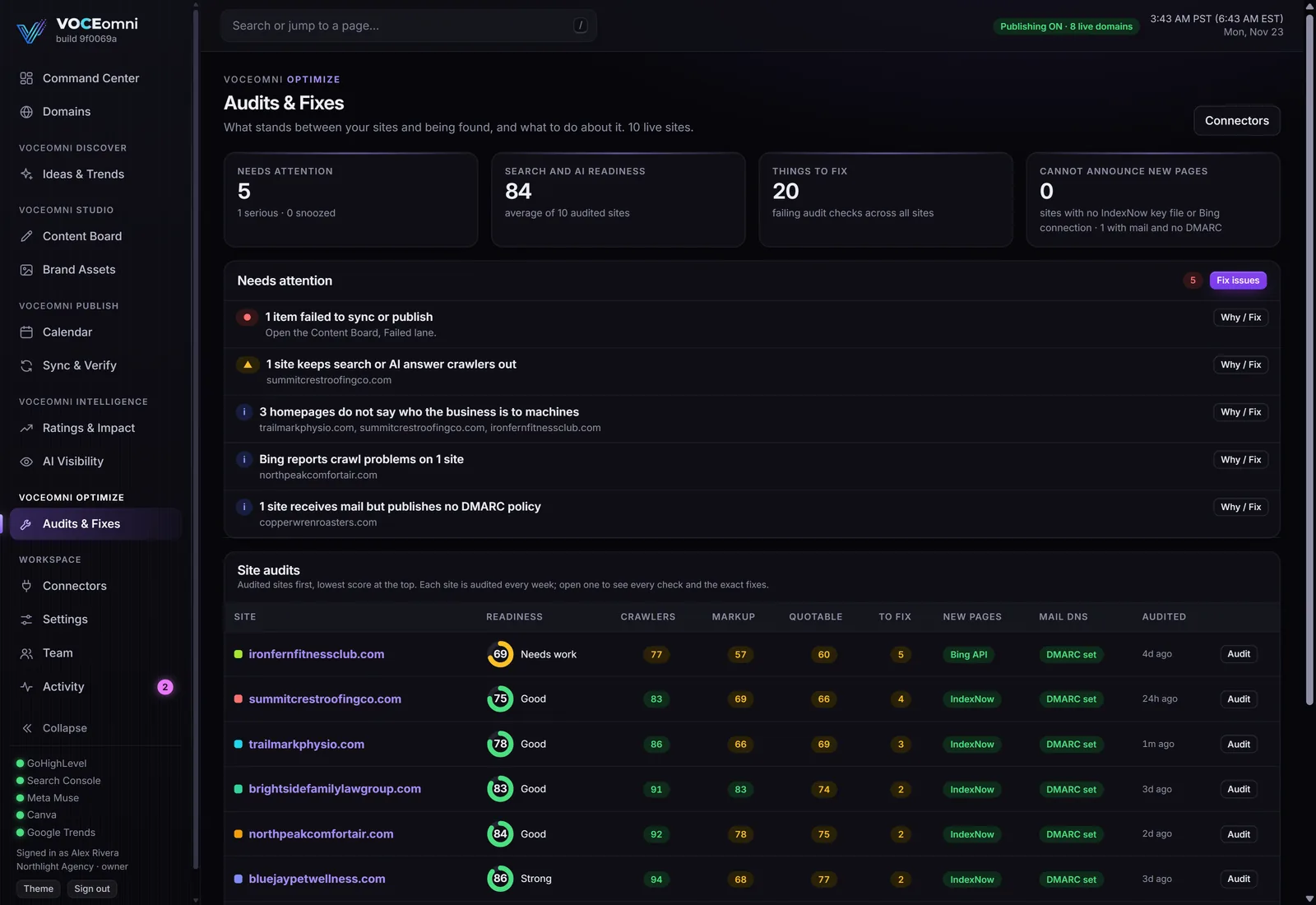
A weekly audit of every live site the way a crawler sees it: the homepage, robots.txt, the sitemap, llms.txt and the newest pages.
Checks whether Google, Bing, ChatGPT search, Claude search and Perplexity are allowed in, and whether a firewall turns AI assistants away.
Checks for real text without JavaScript, Organization, Article and FAQ markup, question headings, freshness, and About and Contact links.
Get the fixes: the exact robots.txt lines, Organization markup and an llms.txt draft, written from what the app knows.
Bing and IndexNow
Daily Bing clicks, impressions, position, indexed pages and crawl issues for each site, from one Bing Webmaster Tools key.
Tell search engines about new and changed pages through IndexNow, with daily limits and a log of every page sent.
Google does not take part in IndexNow.
DNS and hosting
With a DNS provider connected, each domain shows where its DNS lives and its mail, SPF and DMARC records at a glance.
Providers: Cloudflare, GoDaddy and Hostinger.
VOCEomni can add exactly two kinds of record, and only after a person confirms: proof of ownership, and a monitor-only DMARC record.
Nothing that already exists is edited or deleted. Every change is logged with a copy of the zone as it was, and has an Undo.
Guardrails
Controls that keep people in charge of what is written, what is sent, and what is spent.
Content checks
Every draft is checked for punctuation style, American spelling, allowed phone numbers, risky claims, industry compliance wording, leftover placeholders and length.
Near-duplicate detection across every domain in the workspace.
Auto-fix for the checks that have a safe fix.
Publishing controls
An approval gate, a live switch for each domain, and one switch that stops all publishing.
When a client has asked for a change, approving that post asks you to confirm first.
Spending controls
A monthly AI spending cap is a hard stop. Every AI call is logged with its cost at the provider’s list price.
AI-answer checks and lead searches share a monthly budget of their own.
Your choice of AI
You connect your own AI account. No provider is built in and none is preferred.
VOCEomni never switches provider by itself. If the chosen one fails, the draft fails with that provider’s reason and your words are kept.
Two writing models can be saved: one for single drafts and a cheaper one for batches.
Connections
Each workspace connects its own accounts. A key is write-only: once saved, it is never shown again.
Publishing and design
GoHighLevel Social Planner, which carries the social networks.
GoHighLevel contacts, for the leads you choose to send.
Canva, for designs and brand assets.
Search and ranking data
Google Search Console, Google Trends and Google Autocomplete.
Ahrefs Domain Rating.
Bing Webmaster Tools, Open PageRank, PageSpeed and SerpAPI.
AI
Writing: Anthropic, Meta, OpenAI, or an OpenAI-compatible service at an address of your own.
Images: Meta or OpenAI.
Answer checks and lead searches: ChatGPT, Gemini and Perplexity. For ChatGPT you choose the model from a list of the ones your key can use.
Hosting and DNS
Cloudflare, GoDaddy and Hostinger.
Workspace, team and data
Built for agencies and multi-brand teams from the start.
Workspaces and team
Each workspace has its own database, keys, media and schedule, and cannot see another workspace’s data.
Invite-only sign-in with Google.
Three roles: owner, editor and viewer.
An activity page with alerts, an audit trail of who did what, and AI usage.
Your data
Export everything as one archive. Connection keys are left out.
Daily backups of every workspace.
Delete a workspace with a grace period in which the owner can still export or undo.
Look and feel
Dark and light themes that follow your system setting until you choose.
A sidebar that collapses to icons, and motion that switches off for anyone who asks their system for reduced motion.
A search box that finds pages by area.
What VOCEomni does not do
Knowing the edges is part of choosing a tool.
It does not post to social networks directly. Social publishing goes through GoHighLevel Social Planner.
It does not publish blog posts to your website or send emails. It writes and approves them, then hands them over through a feed or an export.
It does not measure Google’s AI Overviews.
It does not email you when a client answers a review link. The answer appears in the workspace.
It does not text, email or call a lead. It builds the list, and what happens next is your decision.
It does not look up private people on the web. A list of people is one you upload.
It does not guarantee rankings or AI citations. Search engines and AI assistants decide those.
Questions about VOCEomni features
Does VOCEomni need GoHighLevel to publish?
Yes, for social posts. VOCEomni sends approved posts to GoHighLevel Social Planner, and GoHighLevel publishes them to the networks connected in your account. VOCEomni does not post to any network by itself. Without GoHighLevel you can still research, plan, write, create images, collect client approvals, run audits and track visibility, and approved content is available through RSS, JSON and calendar feeds and a CSV export.
Which AI providers does VOCEomni work with?
You connect your own account. For writing: Anthropic, Meta or OpenAI. For images: Meta or OpenAI. No provider is built in, none is preferred, and VOCEomni never switches from one to another by itself.
Can a client approve posts without an account?
Yes. A client review link shows the chosen posts the way they will go out, and the client approves each one or asks for a change. The link works for 7, 14 or 30 days and can be taken back at once.
How does VOCEomni find leads?
For business customers, Lead Finder asks one AI search engine you connected for up to 12 businesses in one place, then opens each business’s own website. A business is listed only if its name is on the front page and the site publishes a phone number, an email or a street address, and those details are read from the site, not from the AI’s answer. For private people nothing is looked up: you upload a list you already have. VOCEomni never sends a message to a lead.
See VOCEomni at work
Walk through the product with your own content workflow, your current tools, and the problems you need an integrated platform to solve.